
Forgot Your PIN?

NOTE: You need to have a valid email address listed on your library account to use this feature. If you do not have a valid email listed on your account, please call your local library.

  1. From the Library Account Login page, select Forgot Your Pin?Forgot Your Pin? graphic snip
  2. Enter your library barcode number and select Submit.PIN Request graphic

  3. An email will be sent to your email address with a link. Click on that link.

  4. Fill out the form with your barcode and your new PIN as requested. Click Submit.

Log Into Encore

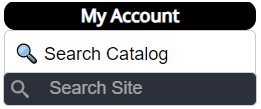
1. Click the "My Account" login at the top of the Library's homepage.

Snapshot of My Account, Search Catalog and Search Site section

2. Enter your library barcode number or username and PIN and click Submit.

Snapshot of Account Login Page


Log Into Encore

1. Click the "My Account" login at the top of the Library's homepage.

Snapshot of My Account, Search Catalog and Search Site section

2. Enter your library barcode number or username and PIN and click Submit.

Snapshot of Account Login Page


Log Into My Account

1. Click the "My Account" login at the top of the Library's homepage.

Snapshot of My Account, Search Catalog and Search Site section

2. Enter your library barcode number or username and PIN and click Submit.

Snapshot of Account Login Page
